Saturday, November 15, 2008

Texas Organiser - Powered by CR2032


Since I was little, I had always wanted one of these organizers. I had always kept a diary and saw it as the best way to keep secrets from prying eyes. It was also small, robust and cheap. Even today, it had a lot of functions that I still quite like.

It had a password protection, a docking station to sync to the PC, fast access to apps and a great search facility. It doesn't have fancy graphics or a graphical user interface, but the text only screen makes it simple. If I needed to look up contacts, notes and schedules all the information would be presented in an instant. No waiting, no double clicking or multiple menus, and no hour glass. When I am super busy and under pressure, getting instant access is so important and I could forgive it's dated looks.

Unfortunately, I couldn't use one today. The data would be gone once the battery dies and I am not fond of the CR2032 batteries. Editing notes on it would be impractical and the memory is too small to hold anything useful. In fact, most of it's functions can be done on a current mobile phone.


Nokia Commucator 9110 - Just too big.


My father used to own one of these smart phones. It was huge and very cool at the time. The fact that it resembled a big phone but could be opened up with a full keyboard was fantastic.

The screen at the time was monochrome and sometimes I prefer that to the color screens of today. It helps to keep me focused and it has less clutter. Sometimes, I wonder why we need colour screens. Do clients really feel inclined to see pictures on a smartphone/pda or would they much prefer to view it on a printed medium.

The applications included your usual notes, contacts, world time but no spreadsheet. The apps didn't require loading. Just press and go. It was a joy to use and synced very well.

It had a long battery life and was in general very reliable. Of course, it just had one problem.

It was just too big.


Friday, November 14, 2008

Zaurus C1000 - Diabolical as PDA, incredible as a Japanese learning tool.


Quite some time ago, I had one of these machines to learn Japanese. Then I realised that nothing beats textbooks, pen and paper. It then got relegated to a PDA. It's based on linux but the processor is too slow to run anything properly. As a Japanese reference / learning tool, nothing beats it. As a PDA, it has some novelty features but I've had better.

Top features include 5 hours continuous use when it was new. I have always been impressed with this. However, charging the PDA also took this long, but it does have a removable battery.

Resume was almost instantaneous and you can twist the screen to portrait or landscape mode. The former is useful when using the stylus as the Japanese Character hand recognition is superb. Talking about superb, the touch screen is absolutely gorgeous, even at half brightness. The high resolution possibly helps somewhat.

For those people who are savvy enough, you can install a linux distro. However, the processor is too slow and even if you managed to install the relevant linux apps, they will be slow and drain the battery life. If you have a mac, don't bother syncing with it. Yes, it's possible but it isn't seamless, and can get complicated with configurations and network setup required.

SD card and CF Card Slot is included which goes without saying, is great for storage. However, the latter seems to crash the Zaurus if you remove it while it's switched on. The reboot takes a very long time, from start to finish. Very painful experience.

It's thick. I don't mind so much when it is in landscape mode and resting on a table or holding it with two hands. It's when it's in portrait mode and I start to use the stylus or my fingers, it just feels too thick. Another thing that doesn't help it or rather, it aggravates it, is the fact that it's rather heavy for a PDA.

Applications once loaded are fast, but when you first load them, it can take a good few seconds, and for a PDA that's painful.
It's not helped by the fact that they also look outdated and seriously ugly. Think windows 3.11. There are also some bugs, such as the built in spreadsheet which forgets to save the formulates when saving in excel format. That is just diabolical and I hope there is an update to fix that.

As you can see it has great novelty features that will cater for the gadget lovers and foreign language students, but it's not the PDA for me.


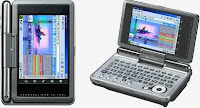
Sony UX490 - UMPC, Between a PDA and a Netbook


With the advent of netbooks and their relatively cheap pricing, tablet pcs and other types of notebooks have seen their prices plummet. It's not surprising considering the current economical climate.

One such product is the Sony UMPC. At first sight, this seemed to be the perfect PDA that I've been searching for. Small, looks gorgeous, slide out keyboards, runs full windows programs, a usable quoted battery life and an added fingerprint reading function, so I don't have to type in the password on the small keyboard.

Then I realized that it was slow to resume. I appreciate the fact that it's running Vista, but while I am prepared to wait for a desktop to load programs, I am not so patient with a PDA. It just has to be almost instant on, so I can put the information in, switch it off and forget about it until the next sync. A PDA is such a device that should be near by, ready to capture any notes or pull information, just by reaching for it.

It's also a bit thick, but considering it's a real computer inside, I can live with it. However, one thing I can't live with is the battery life. Like most quoted battery life, you really have to divide it by two. If your going to use this as a ultra portable computer, then it's reasonable, but as a PDA, not a chance.

I realize that I have taken a blitzed view of the sony offering. It is labelled as a UMPC and not as a PDA, but I have often wondered, who are the UMPC users? Are they just lovers of gadgets?


Apple Mac - Safari vs Firefox

Safari is a fast, very simple and elegant web browser. In fact browsing the internet on the mac has been somewhat a pleasurable experience compared to the pc. Little cosmetic things here and there.

That was until I started to fill in some applications on line. It's foreign language support for changing on the go seemed broken and some sites just plain refused to run on Safari. It just blew my mind that the only thing useful about this browser was just browsing big news sites and apple trailers.

The internet offers far more than just browsing and access to online services seems to be a problem. Even certain email websites just seem to take forever to load or even refuse to work. I guess that's why there is such a need for Parallels.

Determined to persevere, I installed Firefox 3. This looked similar to Safari, but I missed the feature where the window size adjusted accordingly to the website. Firefox was fast, but very PC in nature. Lots of add ons and themes. Nothing Mac like about it except the theme.

All websites that had problems with started to just work. However, some websites just look plain broken, and all over the place, where as in Safari, they were rendered great. I'm pretty sure it's an addon problem, though I haven't encountered any such problem on the PC version of Firefox.

I've come to realize that it's the Mac Way or the Highway. Safari for browsing and Firefox for online services. If only Safari was supported more by business websites. It is so elegant with some nice cosmetic touches.


Apple Mac - Automator

After spending some time recently with an Apple Macbook, I discovered that some web pages saved through the internet browser didn't save with a html extension. No problem, I'll just open the Finder and rename them. The problem was, there were over twenty files.

I discovered that the only way to rename all the files with the necessary html extension was to look for an installed program called automator. This was found either by right clicking, 'don't get me started', or through spotlight.

Using the said program, I had to create something called a work flow, sounds painful. I had to hunt for the section where the rename file utility was, drag it on to a window pane, figure out what to do with it and then boom! It renamed all the files extension with html. What a nightmare!

Still, at least I have discovered this Automator program. It seems to have lots of useful functions, which to be honest, should really have been available in the first place.


OpenOffice 3 for the Mac

At the termp place where I work, the program that runs supreme is the Microsoft Office suite. It gets the job done and is second nature. Then last week I had to use a macbook with no MS office, but instead came with Openoffice version 2x. It was a horrible experience. Made me hammer nails after nails into the coffin of 'get a Mac'.

Then I installed an office suite was called NeoOffice. It did a much better job but it was as if someone took a pc version of Openoffice, stuck a mac theme on it, and plonked it on a mac. It was like Frankenstein, forced to wear a non branded turtle neck sweater. Hammer, hammer, hammer!

Then quite recently OpenOffice 3 for the mac was released. Once I had installed it, I was pleased with the somewhat polished interface compared with the other apps I had previously mentioned. It felt great. Now here was an office suite I thought was going to do very nicely. That was until I started to do some printing. Sometimes words were missing, sometimes frames or borders were missing and at times it crashed. Hammer, hammer, hammer!

I have always admired opensource apps on the PC. Opensource apps on the macs are a nightmare. Most, if not all, require some heathen 3rd party X app to run or they have to be compiled. I don't mind learning how to compile them, if they come with the necessary instructions. But having to wait hours for them to compile is just trying.

Still, I'm sure OpenOffice 3 for the Mac's next update will iron out all the said bugs. Just to end on a positive note.


Going Back to Paper.

The paperless experience has come to a disastrous end. It has made me realize that I am not technologically savvy. I ended up using 2 or 3 PDAs. One had better scheduling entry, the other had had a instant access to notes and the other one was just senselessly pretty. I ended up having so much different information on each one. The problem wasn't even that. The problem was charging, backing up and syncing.

I have now ended up using small sized, colored, pocketable paper notebooks. I just write, date and forget. No backing up. No syncing. No charging.

If only there was a PDA that had an instantaneous , functional interface, keyboard entry input, great syncing.... wait, I remember those old Casio Organizers. No! It can't be.


Thursday, November 13, 2008

.TXT Files - Great! Oh, wait, no alarms.

Having recently been relying on technology for most things, I find myself not adjusting to it in a savvy way. I  use a desktop, pda  and now finally a netbook. There lies the problem. Syncing all the machines. They all use different operating systems. 


Since, I don't really have time or want to spend the time at the moment to search for the apps that can do it, although it can be fun, I have resorted to text files that contains todo lists, notes, and a planner with templates for quick entry. It was great until I started to rely on alarms. 


I realized I needed to sync all the alarms on all three platforms. You may wonder why I don't just choose the PDA as the main platform for alarms since it is the most convenient. Unfortunately, the only convenient thing about it is the size. Compared to the desktop, entry is slow and laborious. Adding notes on the small tiny keys are just tiresome. Viewing all the entries often involve a lot of scrolling, and the amount of information is limited on the small screen. 


Some days, my schedules have to overhauled and on a PDA this is painful. There are also other days when I have to change the schedule on the desktop, sync with the PDA, only to find out I have to overhaul the schedule when I'm out with my netbook. 


Then there is the interface. Don't you hate going from touch screen (pda) to mouse (desktop) to trackpad (netbook)?

What I really need is a really small clamshell PDA that runs the same operating system as the desktop, fits in the pocket and can instantly resume and have at least two working days of battery life, in case I forget to charge daily. Unfortunately, companies nowadays seems to purposely provide only four out of the five things I need.


Wednesday, November 12, 2008

Netbooks - Too big for comfort.

When the first netbook came out, the price was a big factor. It was so cheap that we could forgive the small keyboard, the small screen screen and the paltry battery life.

Now the netbooks are getting better battery life, bigger keyboards and screens. The latter had to be forthcoming, but the bigger keyboards has also made the overall size of the netbook large enough to think, why shouldn't I just get a notebook computer.

The price of the netbooks are also getting close to the notebook range. The notebooks have bigger screens which, after prolonged use, it is hard to adjust to the 8.9 to 10 inch screens and the economized trackpads.

Netbooks used to be cheap and fun. Now, it's just feels slightly smaller than a notebook, with less performance and slightly less in price.


Blog Archive